



Roxily is a chore rotation app for two people sharing a home. Use alternating responsibility for tasks you want to take turns doing, such as taking out the bins, cleaning the bathroom or feeding a pet.
It is designed for couples living together and also suits two roommates. Both people see the task, schedule and current responsibility in the same Space.
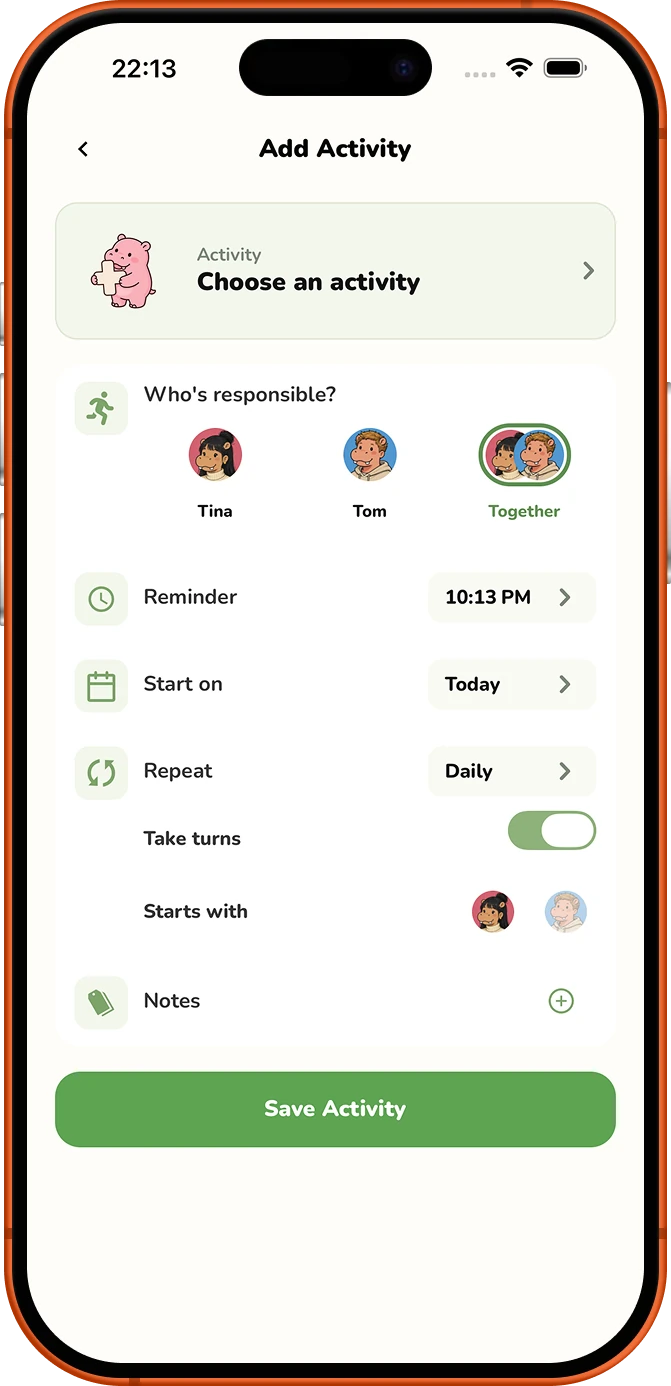
Set up a rotating chore
- Add an Activity, using a preset or your own description.
- Choose alternating responsibility and the people in the rotation.
- Set a repeating schedule that matches how often the chore needs doing.
- Choose a reminder time and allow notifications.
- Complete the Activity when it is done and check who is responsible for the next occurrence.
Choose chores that work well in turns
Rotation helps when both people can do the same job and want to share it over time. For example, alternate a weekly bathroom clean instead of assigning it permanently to one person.
For work tied to different schedules, fixed responsibility may be easier. One person might usually handle a grocery pickup because they pass the shop on the way home. You decide which arrangement fits; Roxily records it.
Agree on the full task
Make the description specific. “Laundry” could mean starting the machine or washing, drying and putting clothes away. Discuss that before setting the rotation.
If someone is away or cannot do their turn, update the responsibility together. A rotation is a plan you can adjust, not a measure of what each person owes.
Check the pattern over time
Look at completed work in Journey and discuss whether the split is working. Task counts do not capture every difference in time or effort.
For more scheduling options, read recurring household chores. For an initial split, see the chore app guide for couples.
Roxily works on iOS and Android. You can start free; check the current Premium plan for automatic scheduling and unlimited Activities.
Download Roxily on the App Store · Get Roxily on Google Play