



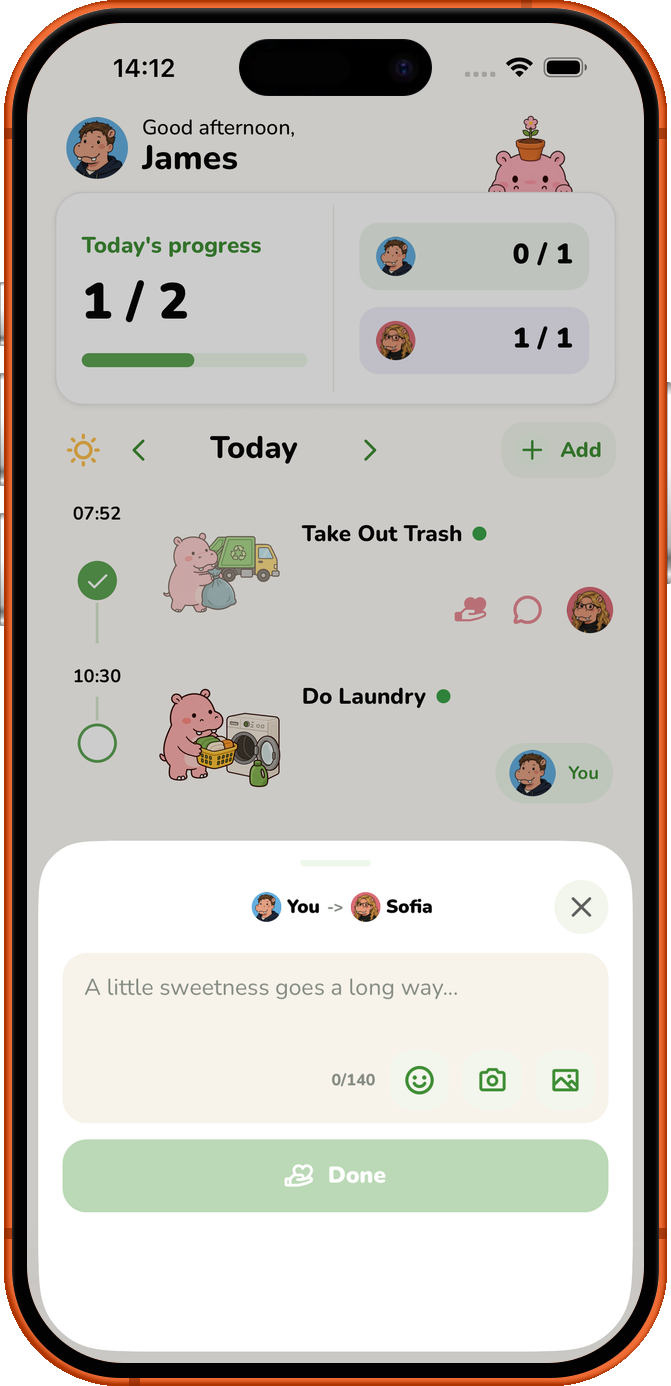
Roxily lets you thank your partner after a shared Activity is completed. Send a heart, a message or a meme, with the thank-you connected to the task they finished.
It is a household app for two people living together, so the same shared plan shows chores, responsibility and completed work. Couples are the main focus; two roommates can use it too.
Say thanks while the task is easy to notice
Open a completed Activity and send a thank-you. A quick heart works when you want to acknowledge the effort without composing a message. Use a note when you want to say something specific, such as “thanks for getting the shopping after work.”
You can include a meme or a photo with your message. Pick something you know the other person will appreciate.
Keep appreciation connected to shared responsibility
A thank-you is useful for ordinary work as well as an unexpected favour: putting the laundry away, cleaning after dinner or taking care of a pet.
You still need a division of chores you both agree to. Sending thanks is not a substitute for doing your share or listening when the arrangement is not working.
Set up the shared list first
Join the same Space, add an Activity and choose responsibility. Mark the task complete when the work is done so the other person can see it and respond.
For repeated chores, set a schedule and use rotation if you want to take turns. That gives both people chances to contribute and to notice each other’s work.
See the shared chore setup or how to track completed household work for the rest of the routine.
Roxily is available on iOS and Android. You can start free; check current plan details for Activity limits and Premium features.
Download Roxily on the App Store · Get Roxily on Google Play